

What does an emergency plan for single parents need?
An emergency plan for single parents needs everything a family plan has, plus a backup adult who can step in for your children when you are the one who is sick, hurt or stuck, and the written details that adult would need. In a two-parent home the second adult is the backup by default. When you parent alone, nobody is, until you name them.
Ready.gov's family plan page (last updated 2023) covers the basics every household shares: pick an out-of-town contact, decide where to meet, write down contacts, and make sure everyone has copies. This guide adds the single-parent layer on top and spreads it across one week, because a week of ten-minute jobs is something a tired parent can actually finish.
The point of the plan is not the disaster. It is the ordinary Tuesday when you cannot get to the school gate.
A mini story: the call from the school office
A mother of two gets a migraine so bad she cannot see the road. It is 2:40. Pickup is at 3:15. Her sister lives twenty minutes away and would come in a heartbeat, but the school has never heard of her sister, and the six-year-old's inhaler is in a kitchen drawer nobody else knows about.
Nothing about this is a disaster. It is a Tuesday. And it is the exact situation most emergency plan templates skip, because they are written for floods and fires and assume two adults at home. The fix took her one phone call to the school, one card per child and a printed page on the fridge. That is the first week below.
Honest limits of this plan, and of our app
- It is not legal guardianship. Telling a school who may pick up is not the same as naming a guardian. That is a legal step that differs by place; a family lawyer or legal aid office can help.
- Family Ready organizes what you type. It is not an emergency service, it does not detect that you are hurt, and it never calls or messages anyone for you. In an emergency, call your local emergency number.
- Sharing with your backup is a Plus feature. Inviting trusted people to view sections is part of Family Ready Plus (monthly or annual). The free route is the printed Emergency Snapshot PDF.
- Keep paper too. As the App Store listing says: no app helps if a phone is lost or out of battery.
Your first week: a 7-day emergency plan for single parents
One job a day. Most take ten to fifteen minutes. Skip a day and pick up the next one; the order matters more than the pace.
- Day 1
Name your backup adult
Pick one person who could reach your kids within an hour or two. Ask them. A yes you have not heard is not a plan.
- Day 2
Make your own Emergency Card
Your card first, not the kids'. Who to call first, your medicines, and a line that says I am a single parent; my children may be home alone.
- Day 3
Make one card per child
Allergies, medicines, health notes, school name. Ten minutes a child. Family Ready lets you skip any question with I don't know and come back.
- Day 4
Tell the school in writing
Add your backup to the pickup list at school, daycare or the after-school program. Ask what form they need. Most have one.
- Day 5
Add an out-of-town contact
Ready.gov's family plan advice: pick someone out of town, because they may be easier to reach in a disaster. A grandparent two states away counts.
- Day 6
Pack the kid half of the kit
Ready.gov's kit list includes infant formula, bottles, diapers and wipes, plus prescription medicines and activities for children. Start with whatever your youngest needs.
- Day 7
Print it and hand it over
Print the free, dated Emergency Snapshot PDF. Give a copy to your backup adult. Put one on the fridge. Set a 3, 6 or 12-month review.
Seven small jobs, one printed page, one adult who has said yes.
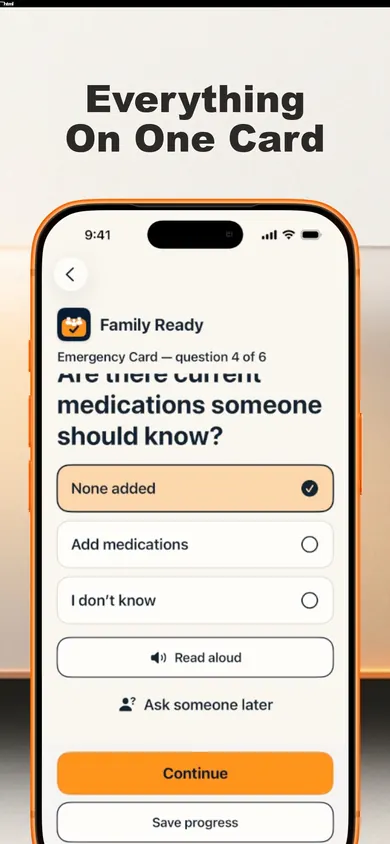
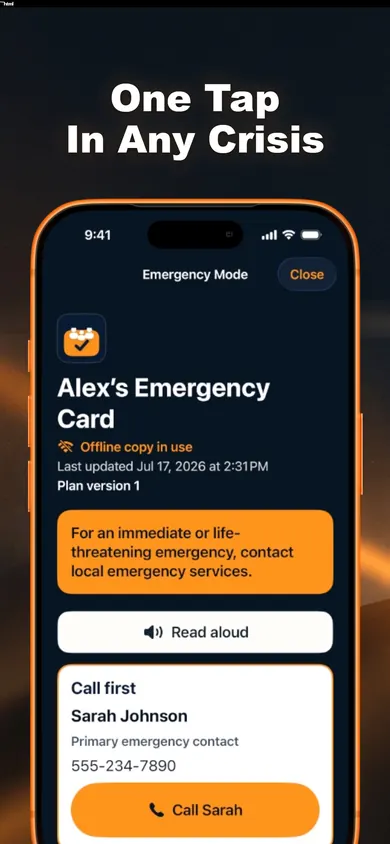
How it works in Family Ready, in 3 steps
- Answer the card questions. Who to call first, allergies, medicines, important health notes. You can make a card for yourself and one for each child.
- Fill the plan in any order. Contacts, health, documents, home, dependants and pets, care instructions. Skip what does not apply to you.
- Print, then review. Print the dated Emergency Snapshot PDF for your backup adult, and choose a 3, 6 or 12-month review schedule.
One design decision we made: Emergency Mode shows no ads, no pop-ups and no purchase prompts, ever, and the Emergency Card never needs a subscription. A parent opening it in a bad moment should only see the card.
Single parent emergency plan options compared
| Option | Good at | Weak spot for a solo parent |
|---|---|---|
| Ready.gov printable plan | Free, official, simple | Lives in one place; easy to let it go out of date |
| School emergency form | Gets your backup on the pickup list | Covers school hours only, not bedtime or medicines at home |
| Notes app on your phone | Always with you | Locked phone, dead battery, no structure |
| Family Ready (we make it) | Cards per child, offline Emergency Mode, free printable snapshot, review reminders | iPhone only; sharing with a backup in-app needs Plus |
Who should pick something else: if you do not use an iPhone, or you already keep a binder you update, stay with paper and the school form. They work. Use this week's list either way.
Questions single parents ask
What should a single parent's emergency plan include?
Everything a regular family plan has (contacts, a meeting place, a kit) plus the part only a solo parent needs: what happens to your children if you are the one who is hurt. That means at least one named backup adult, written pickup permission at school or daycare, and your children's health details somewhere that adult can find.
Who should be my backup adult?
Someone who lives close enough to reach your children within an hour or two, who your children already know, and who has said yes out loud. Ready.gov also suggests an out-of-town contact, because someone far away may be easier to reach in a disaster. Ideally you have both.
Do I need a lawyer to name an emergency backup?
Not for the everyday version in this guide: telling the school who may pick up and writing down care instructions. Naming a legal guardian is a separate, legal step, and the rules differ by state and country. If you want that, talk to a family lawyer or legal aid office.
How do I explain this to my kids without scaring them?
Keep it short and practical: "If I'm ever sick and can't come, Aunt Dee picks you up." Kids handle a named person and a simple rule better than a list of disasters. Practice the backup's phone number like a game.
Is Family Ready free for a single parent?
The Emergency Card, Emergency Mode, the household plan, the kit checklist, encrypted backup and the dated Emergency Snapshot PDF are free. Inviting trusted people to view sections, household sync, guided reviews, reminders and extra printable packs such as the Caregiver Handoff are part of Family Ready Plus, a monthly or annual subscription.
Can my backup adult see my plan in the app?
With Family Ready Plus you can invite trusted people to view only the sections you allow, after you preview them. On the free tier, print or export the dated Emergency Snapshot PDF and hand them a copy. Family Ready never calls or messages anyone for you.
Updated November 2026